- Sử dụng Cáp console RJ45 của đúng hãng Raisecom đi kèm
- Cắm vào cổng CONSOLE trên Switch.
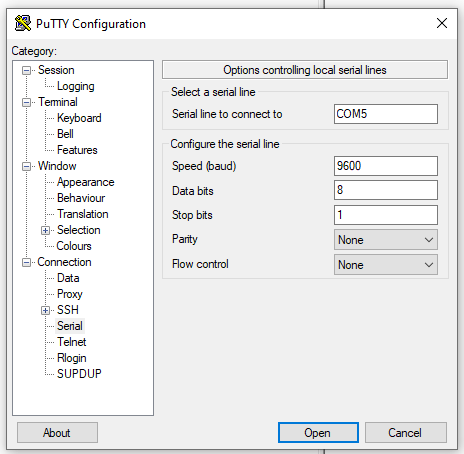
- Thông số cài đặt cổng COM như sau:
- Tốc độ Baud: 9,600
- Data bits: 8
- Stop bits: 1
- Parity: None
- Flow control: None
- Thông tin user mặc định: raisecom
- Thông tin mật khẩu mặc định: raisecom
Câu lệnh đăng nhập và xem thông tin module quang SFP gắn vào cổng quang
Login:Login:raisecomPassword:Raisecom#2010-01-01,08:39:07 user debug-6-LOGIN_SUCCESS:The user 'raisecom' from console login successfulRaisecom#enableCurrent privilege:15Raisecom#config terminalConfiguration mode, one command input per times. End with CTRL-Z.CONFIG-I:Configured from console ...Raisecom(config)#show transceiver ddm port-list 2If device is externally calibrated, only calibrated values are printed.++ : high alarm, + : high warning, - : low warning, -- : low alarm, * :normalTx: transmit, Rx: receive, mA: milliamperes.Port: port2ParaName Unit Value Status-----------------------------------------------------------------------Temperature Celsius 38.9530 *Tx bias Current mA 7.6440 *Optical Tx Power dBm -2.2110 *Optical Rx Power dBm -36.9890 --Supply Voltage Volts 3.2520 *


Leave a comment